 MuteBand
Install
Install the free VB-CABLE driver, then MuteBand. The installer downloads the separation models (about 3.5 GB).
Download VB-CABLE ↗Turn down an instrument in the music playing on your PC. Pick up yours, and play along.
⊞ For Windows 10 & 11 · Graphics card with 6 GB+ required
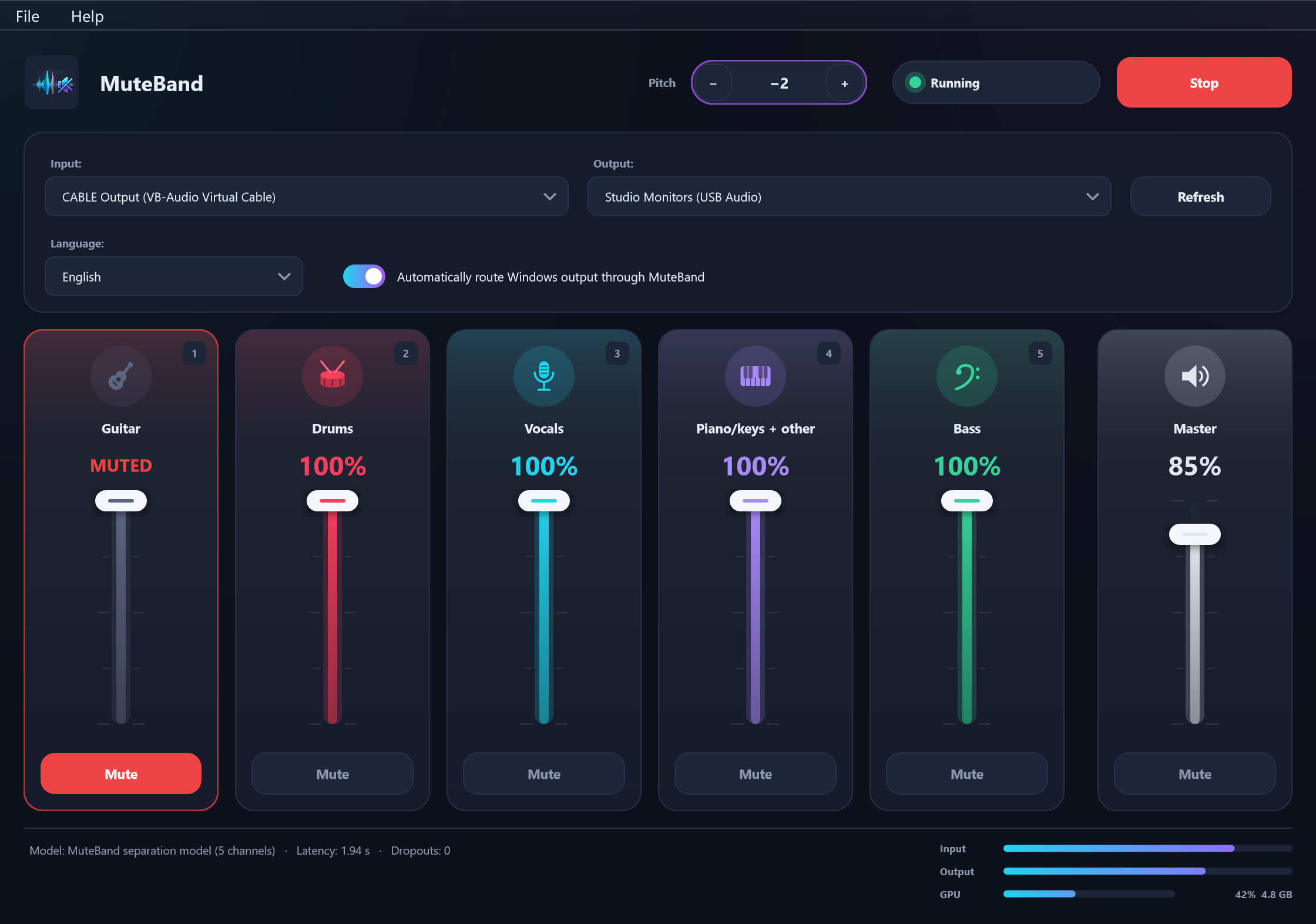
MuteBand for Windows · Actual app interface
Keep your favourite player. Make space for the part you want to practise.
Install the free VB-CABLE driver, then MuteBand. The installer downloads the separation models (about 3.5 GB).
Download VB-CABLE ↗Your license key is entered once, during installation. Choose CABLE Output as input and your headphones or speakers as output, press Start and play your music.
Mute or turn down an instrument, pick up yours, and play along.
Guitar, Drums, Vocals, Piano/keys + other and Bass, with a master volume.
Shift the pitch from −12 to +12 semitones to suit the part you’re playing.
Use the music already playing on your PC — Spotify, YouTube or any other player.
Separation runs locally on your graphics card. Your audio never leaves your computer.
The app supports English, Turkish, German, French, Spanish and Italian.
MuteBand works with the music already playing on your computer.
Demo video placeholder — a product recording will be added here.
Windows 10 (1903+) or Windows 11, 64-bit. macOS is coming later.
DirectX 12 graphics card with at least 6 GB of video memory (NVIDIA, AMD), or an Intel Core Ultra processor with Intel Arc graphics.
8 GB RAM (16 GB with Intel Arc integrated graphics) and about 5 GB of free disk space.
Needed during installation (about 3.5 GB download) and to activate the license. MuteBand then works offline for up to 30 days.
Free VB-CABLE by VB-Audio. Install it separately before using MuteBand.
About 2 seconds on fast cards; about 3 seconds on slower laptops. This delay suits playing along. Fast cards can mute up to two channels at once; use fewer on slower computers.
Yes. It processes the audio already playing on your Windows computer, including Spotify, YouTube and other players.
Yes. Sound is a few seconds behind the original: about 2 seconds on fast graphics cards and about 3 seconds on slower laptops.
No. Audio separation happens locally on your graphics card; audio never leaves your computer.
After buying, download the installer (about 35 MB) from the customer portal link in your e-mail, run it and enter your license key. It downloads the separation models (about 3.5 GB) during installation, so you need an internet connection and about 5 GB of free disk space.
A one-time purchase gives you a license key by email. Activation is per computer; the number of computers is [TBD]. The app checks the license online and works offline for up to 30 days.
There is no trial version. MuteBand costs 10 USD, one-time. If it does not work on your computer, you get a full refund within 14 days, no questions asked.
MuteBand currently supports Windows only. macOS is coming later; no release date has been announced.
Make room for the part only you can play.
Get MuteBand ↗One-time purchase · 10 USD · 14-day refund
MuteBand is not available in the United States or South Korea.
The United States restriction includes its territories.